
I was fortunate enough to be gifted by Michael with a top of the line Dell ‘One’ 2323 Touchscreen 23″ all in one computer. I absolutely love it, and it is by far the nicest computer I’ve ever owned.
Windows 8 is not entirely different than what we’re used to with other versions of Windows operating systems. The major difference is in the start menu. What I’ve realized is the new start menu is just a different – more interactive, and more “powered” up – version of the older start menus. Personally I really love it. I know there are many who don’t but its so…. geeky LOL which suits me perfectly. (Anyone who knows me also knows how much of a geek-ette I can be.)
What I love the most is that I can stream my social media (Facebook and twitter for now) in the side panel while I’m working in the main panel. I love being on the start screen and seeing everything auto updating. Very cool.
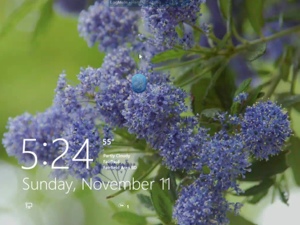
The lock screen is also different, than what used to be. It now allows for a picture, and shows one of two active Windows 8 Apps that will update while on the lock screen. Weather or Calendar. (Being a weather junkie, I’m sure you can guess which one I chose.) You can also personalize the lock screen and use one of your own.
I have not tried the picture password yet, but I also think that would be neat too. I saw the videos explaining that and showing examples so I know its a feature I’ll implement but haven’t had a chance to set it up yet.
 I also like using the ‘charms’ to the right of the screen. A quick swipe from the right will bring them up, from there you can pick the start screen, settings and more. What I quickly realized is that if you choose settings from anything other than the desktop, you’ll get settings that are relevant to the screen you’re in.
We got the new computer the day before hurricane Sandy was due to hit. I have to say that thankfully, by time the power went out, it was already late for us and we just went to bed and tried to sleep. But since then, I’ve been blessed to be able to help several temporary clients with their office services while they were waiting for power, phones, internet or waiting to find temporary office space. As a result, I’ve been pretty busy and haven’t had the luxury of really playing with and getting to know the new computer. I still have my phone system on my old Windows XP laptop, and haven’t had the chance to try it on the new system. Will have to do an update once I’ve tried that out. I will have to replace that old laptop at some point but for now, it will do.
Between the laptop, the TV Michael gave me for Christmas last year, the new computer and the second monitor, then the iPad also on the desk… I think that when someone coined the phrase “Screen Real Estate” he wasn’t referring to that! Nope… I’m NOT posting a picture of that – until I’ve put the mountain of CDs and DVDs away from reloading my software. 🙂
Right now I’m on the iPad writing this with my leg propped up like a good girl. And remotely controlling the new computer upstairs. I’ve discovered it doesn’t really like the
I also like using the ‘charms’ to the right of the screen. A quick swipe from the right will bring them up, from there you can pick the start screen, settings and more. What I quickly realized is that if you choose settings from anything other than the desktop, you’ll get settings that are relevant to the screen you’re in.
We got the new computer the day before hurricane Sandy was due to hit. I have to say that thankfully, by time the power went out, it was already late for us and we just went to bed and tried to sleep. But since then, I’ve been blessed to be able to help several temporary clients with their office services while they were waiting for power, phones, internet or waiting to find temporary office space. As a result, I’ve been pretty busy and haven’t had the luxury of really playing with and getting to know the new computer. I still have my phone system on my old Windows XP laptop, and haven’t had the chance to try it on the new system. Will have to do an update once I’ve tried that out. I will have to replace that old laptop at some point but for now, it will do.
Between the laptop, the TV Michael gave me for Christmas last year, the new computer and the second monitor, then the iPad also on the desk… I think that when someone coined the phrase “Screen Real Estate” he wasn’t referring to that! Nope… I’m NOT posting a picture of that – until I’ve put the mountain of CDs and DVDs away from reloading my software. 🙂
Right now I’m on the iPad writing this with my leg propped up like a good girl. And remotely controlling the new computer upstairs. I’ve discovered it doesn’t really like the 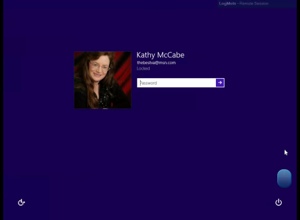 new start menu, but, still controls the desktop and second screen with no problems. The screen shots in this article were taken logged into the desktop from the iPad.
I love technology… 😉
Kathy McCabe
]]>
new start menu, but, still controls the desktop and second screen with no problems. The screen shots in this article were taken logged into the desktop from the iPad.
I love technology… 😉
Kathy McCabe
]]>
My Journey with Windows 8
 Ok… I get it… I need to be marketing with social media… But it’s crazy trying to navigate all the different platforms, and trying to find one that isn’t confusing as all get out is… well… confusing! Not to mention finding one that will work with all the ‘streams’ such as Facebook, LinkedIn, Twitter, pinterest, and who knows what all else.
I don’t like to be distracted by all the different apps open and flashing or beeping or dinging all the time while I’m trying to work. I don’t even check email (manually I mean by pressing the send/receive button) all that often. Every once in a while I’ll have a little note pop up saying I have new items in my inbox, and if I’m not busy at that moment I might check on it. I really don’t like distractions! 🙂
For me, it used to be that social networking was rather more personal than professional. Facebook was a place where all my friends get together, Twitter was the place to catch who was catching a cab (or whatever) at that moment, LinkedIn was the place to put my “professional” profile, and when Pinterest came along it was the place to put all those things you just thought were cool or pretty or you couldn’t live without up for others to learn about what makes you tick.
I’m looking for an “all in one” option for my social network/marketing. And I’d actually prefer it to be on my iPad… that way I can literally close the distractions down until I have time to browse. Ideally I’d love something that had all the social sites I belong to but I haven’t found one.
I’ve tried HootSuite but since there is no pinterest app, it was disappointing, but more than that it was extremely jumbled – and their iPad app doesn’t seem to be available in the US Apple app store, even though the website is saying it is. I found to be too complicated for me to want to navigate it every day. I played around with TweetDeck and while it’s sleek and neat, it’s only twitter (of course since it’s a Twitter product! Duh! Kathy) so that won’t work…
After checking out countless apps on iPad, I stumbled on one I already have. Flipboard! I do love the layout as far as reading new postings. I can respond, post, like and retweet as much as I want, but not all the ‘streams’ at once. And graphically, I like the news style layout. What I don’t like is that there are no notifications to view the latest updates, and I haven’t seen a section where I can view my messages or likes. But FlipBoard does have a “Covers” section that shows the latest news. I’d still like an icon badge that shows how many new items there are.
For an all in one posting app for Twitter, Facebook and LinkedIn, I’m using HomeBase. I do like it since I can pick which ‘stream’ I post to. This means I can differentiate the personal from the business.
So this at least will work for a while until I can find something I like more. If you have suggestions for an all in one on the iPad that does all I’d like it too, give me a shout!
Have a productive day! Kathy]]>
Ok… I get it… I need to be marketing with social media… But it’s crazy trying to navigate all the different platforms, and trying to find one that isn’t confusing as all get out is… well… confusing! Not to mention finding one that will work with all the ‘streams’ such as Facebook, LinkedIn, Twitter, pinterest, and who knows what all else.
I don’t like to be distracted by all the different apps open and flashing or beeping or dinging all the time while I’m trying to work. I don’t even check email (manually I mean by pressing the send/receive button) all that often. Every once in a while I’ll have a little note pop up saying I have new items in my inbox, and if I’m not busy at that moment I might check on it. I really don’t like distractions! 🙂
For me, it used to be that social networking was rather more personal than professional. Facebook was a place where all my friends get together, Twitter was the place to catch who was catching a cab (or whatever) at that moment, LinkedIn was the place to put my “professional” profile, and when Pinterest came along it was the place to put all those things you just thought were cool or pretty or you couldn’t live without up for others to learn about what makes you tick.
I’m looking for an “all in one” option for my social network/marketing. And I’d actually prefer it to be on my iPad… that way I can literally close the distractions down until I have time to browse. Ideally I’d love something that had all the social sites I belong to but I haven’t found one.
I’ve tried HootSuite but since there is no pinterest app, it was disappointing, but more than that it was extremely jumbled – and their iPad app doesn’t seem to be available in the US Apple app store, even though the website is saying it is. I found to be too complicated for me to want to navigate it every day. I played around with TweetDeck and while it’s sleek and neat, it’s only twitter (of course since it’s a Twitter product! Duh! Kathy) so that won’t work…
After checking out countless apps on iPad, I stumbled on one I already have. Flipboard! I do love the layout as far as reading new postings. I can respond, post, like and retweet as much as I want, but not all the ‘streams’ at once. And graphically, I like the news style layout. What I don’t like is that there are no notifications to view the latest updates, and I haven’t seen a section where I can view my messages or likes. But FlipBoard does have a “Covers” section that shows the latest news. I’d still like an icon badge that shows how many new items there are.
For an all in one posting app for Twitter, Facebook and LinkedIn, I’m using HomeBase. I do like it since I can pick which ‘stream’ I post to. This means I can differentiate the personal from the business.
So this at least will work for a while until I can find something I like more. If you have suggestions for an all in one on the iPad that does all I’d like it too, give me a shout!
Have a productive day! Kathy]]>